Navigation
How to move around Ordinary Animator — the main menu, entity modes, and the account menu.
Ordinary Animator is organised around entities — projects, episodes, scenes, shots, characters, locations, and props. Each entity has multiple modes (views), such as Media, Properties, or Timeline. Navigation is designed to get you to any entity and any mode in as few clicks as possible.
The main menu
Click the Ordinary Animator logo in the top-left corner to open the main navigation menu. It has three columns:
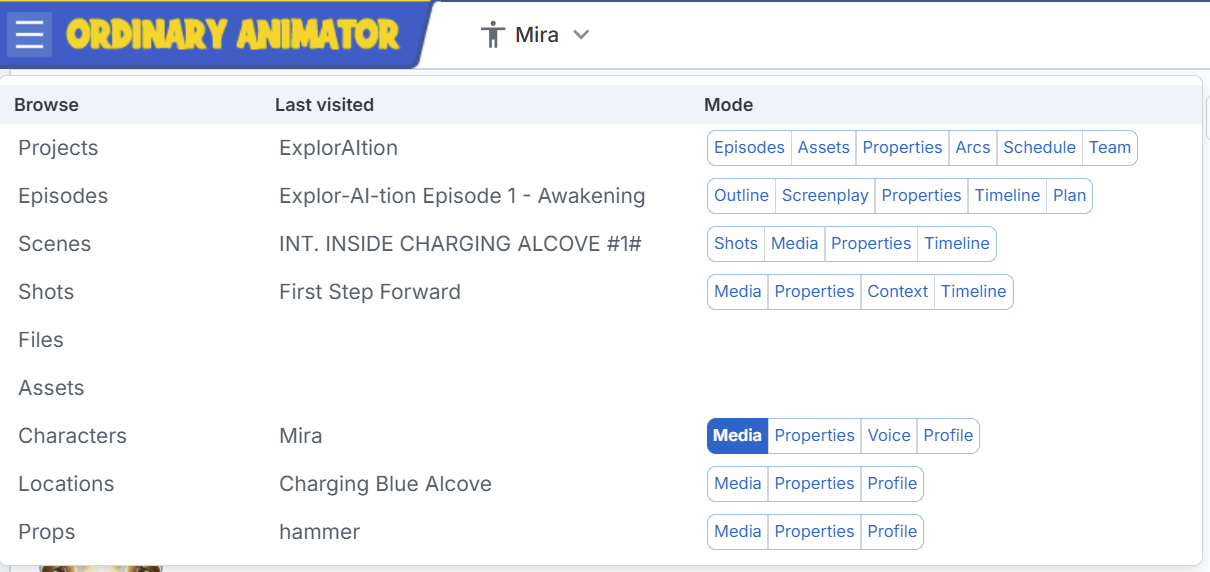
| Column | What it shows |
|---|---|
| Browse | Entity types you can navigate to — opens the full list for that type |
| Last visited | The most recently opened instance of each entity type — jump straight back to where you were |
| Mode | The available modes for that entity — click a mode button to go directly to the last visited instance in that mode |
For example: clicking Media next to Characters opens the character "Mira" in Media mode immediately, without going through the list first. The highlighted button (filled blue) shows the mode you're currently in.
Entity types in the menu
| Entity | Modes |
|---|---|
| Projects | Episodes, Assets, Properties, Arcs, Schedule, Team |
| Episodes | Outline, Screenplay, Properties, Timeline, Plan |
| Scenes | Shots, Media, Properties, Timeline |
| Shots | Media, Properties, Context, Timeline |
| Characters | Media, Properties, Voice, Profile |
| Locations | Media, Properties, Profile |
| Props | Media, Properties, Profile |
| Files | — (opens the file browser directly) |
| Assets | — (opens the full asset list) |
The account menu
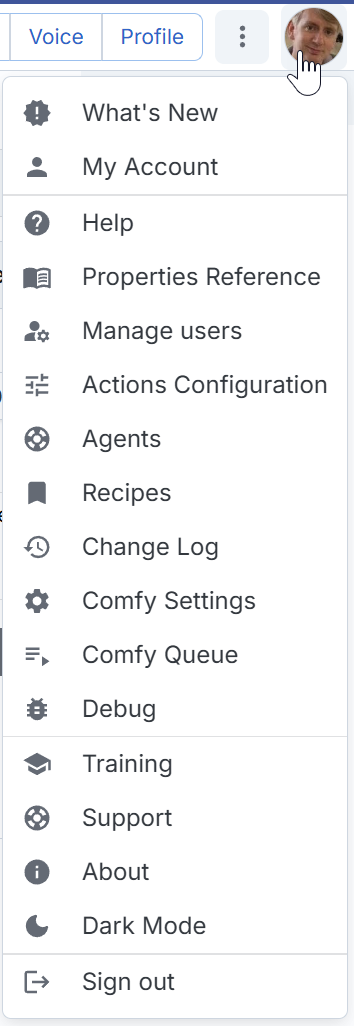
Click your avatar in the top-right corner to open the account menu. This contains settings and configuration rather than content navigation.
| Item | Purpose |
|---|---|
| What's New | Recent changes and new features |
| My Account | Account settings and preferences |
| Help | Help and documentation |
| Properties Reference | Reference for all entity property fields |
| Manage Users | Admin-only user management |
| Actions Configuration | Configure workflow action templates |
| Agents | Manage AI agent configurations for this project |
| Recipes | Open the Cookbook |
| Change Log | Project change history |
| Comfy Settings | Configure local ComfyUI or Comfy Cloud connection |
| Comfy Queue | View active and completed ComfyUI jobs |
| Debug | Developer diagnostics |
| Training | In-app tutorial courses |
| Support | Contact support |
| About | Application version and info |
| Dark Mode | Toggle light/dark theme |
| Sign out | Sign out of your account |